Skip to main content
How do I...?
How Do I Release Category Reports through the ExamSoft Portal?
Instructors can release category-level feedback without releasing the overall score when the instructional goal is remediation and helping students identify gaps in their knowledge.
Procedure
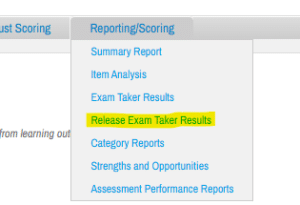
- Find your assessment and click on the Reporting/Scoring tab.
- Select Release Exam Taker Results from the listed options.
3. Select all students, scroll to the bottom of the page, and click Next
4. That will bring you to the page shown below.
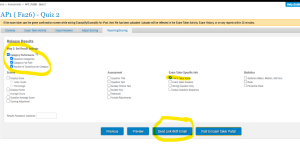
5. Only select the Category performance checkboxes and the Exam Taker name (highlighted above).
6. Then you can either Send Link with Email or Post to Exam Taker Portal.
Need Extra Support?
We are here to partner with you as you enhance your courses. If you run into technical issues or want a collaborative consultation, please reach out to our team:
- Email: tlc@neco.edu
- Office Hours: View our current consultation schedule on the TLC website portal