

Generate Strengths and Opportunities Reports in ExamSoft

Skip to main content
How do I...?
Categories
< All Topics
Print

Strengths and Opportunities Report: Instructions for generating student reports in ExamSoft

  1. Open ‘Assessments’
  2. Click on Cell Bio Midterm Fall 2018
  3. Click ‘Reporting/Scoring’ – see the red arrow below
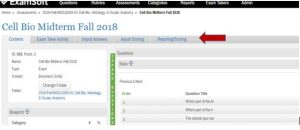
    Screenshot of an ExamSoft exam's Contents page (e.g. "Cell Bio Midterm Fall 2018") with a red arrow pointing to the "Reporting/Scoring" tab in the top navigation.
  4. That will bring you to the page below. Click ‘View Results for exam takers’ (red arrow)
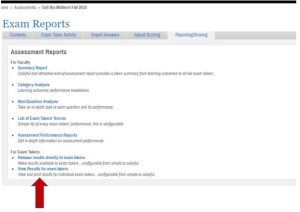
    Screenshot of the ExamSoft Exam Reports page listing available report types (Summary Report, Category Analysis, Item/Question Analysis, List of Exam Takers' Scores, Assessment Performance Reports, Release results directly to exam takers, View Results for exam takers), with a red arrow pointing to the "View Results for exam takers" link.
  5. You will be directed to the page below called Strengths and Opportunities. This will list all of the students who took your exam.
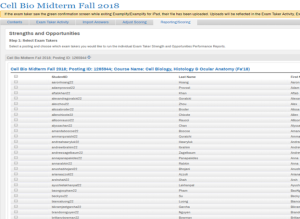
    Screenshot of the ExamSoft "Strengths and Opportunities" page (Step 1: Select Exam Takers), showing a checkbox list of exam takers by Student ID, Last Name, and First Name.
  6. On the left hand side of the screen (see above) you will have the ability to check off a box to select the individual you want to run a report for. You can select multiple students at a time.
  7. When a student has been selected, scroll to the bottom of the page and click the ‘NEXT’ button.
  8. You will be directed to the page below. Make sure to check the boxes exactly as they are in the image below.
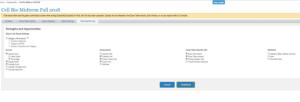
    Screenshot of the ExamSoft "Strengths and Opportunities" page (Step 2: Set Result Settings), showing checkbox options grouped under Scores, Assessment, Exam Taker Specific Info, and Statistics, with Cancel and Download buttons at the bottom.
  9. Then click ‘Download’. A pdf report will be generated and you will be able to print it.

Need Extra Support?

If you have questions about generating Strengths and Opportunities reports in ExamSoft, we’re happy to help.

Was this article helpful?
0 out of 5 stars
5 Stars 0%
4 Stars 0%
3 Stars 0%
2 Stars 0%
1 Stars 0%
5
Please Share Your Feedback
How Can We Improve This Article?
Table of Contents